Your rank for every phrase
In each of 52 countries, plus Google Play ranks with Pro.
VisualASO is an App Store keyword research tool for Mac. It checks where your app ranks for each phrase in each country, how many people search for it, and how hard the top ten is to reach. Then it writes the listing that goes after them.
| Phrase | Verdict | Best rank | Demand | Difficulty |
|---|---|---|---|---|
| habit tracker | Push | #9 | 47 | 42 |
| daily habits | Push | #3 | 30 | 31 |
| streak tracker | Win | #1 | 36 | 21 |
| habit app | Hard | #37 | 44 | 71 |
| routine planner | Push | #8 | 29 | 37 |
| morning routine | Maybe | #40 | 44 | 49 |
| goal tracker | Push | #18 | 48 | 41 |
| habit journal | Maybe | #4 | 23 | 21 |
| build habits | Push | #44 | 33 | 30 |
| self care checklist | Win | #1 | 27 | 13 |
| daily checklist | Win | #2 | 37 | 29 |
| to do list | Hard | — | 74 | 91 |
| planner | Hard | — | 50 | 83 |
| water reminder | Swap | #98 | 5 | 53 |
| habit calendar | Push | #9 | 42 | 35 |
| habit planner | Maybe | #6 | 22 | 29 |
| gewohnheiten tracker | Push | #7 | 58 | 24 |
| routine app | Maybe | #19 | 22 | 33 |
| suivi des habitudes | Win | #3 | 45 | 18 |
| routine quotidienne | Maybe | #16 | 54 | 58 |
| 習慣トラッカー | Win | #2 | 52 | 28 |
| 習慣化 | Push | #23 | 66 | 45 |
| tiny habits | Maybe | — | ? | 34 |
| habit stacking | Maybe | #31 | ? | 25 |
Other tools give you one number and no source. VisualASO measures each phrase in each country, tells you which instrument measured it, and shows a “?” where nothing could — never a made-up zero.
VisualASO reads the App Store for you, in every country you sell in, and turns what it finds into one board of verdicts.
In each of 52 countries, plus Google Play ranks with Pro.
Apple's search suggestions, and Apple Ads popularity if you sign in.
Win, Push, Maybe, Hard, Swap or Dead, with one line on why.
Name, subtitle and keyword field, inside Apple's limits.
Shown to you first. Never submitted for you.
Search for it by name. VisualASO reads your listing and suggests phrases to track.
Rank, demand and difficulty for each phrase, in each country you pick.
Rewrite your listing around them, translate it, and fill a new version.
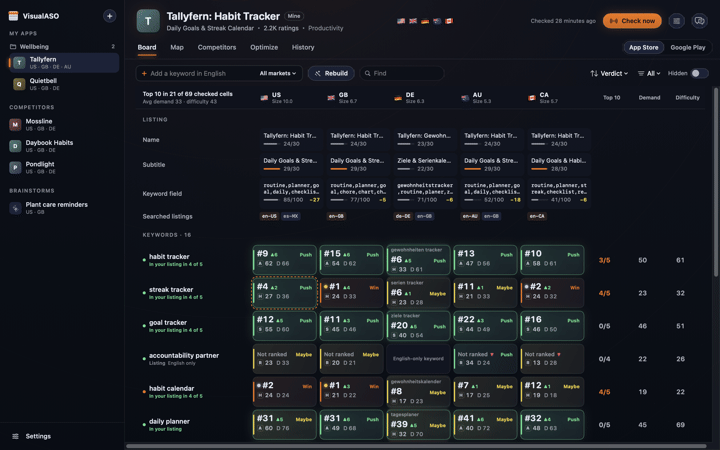
Four views of the same truth: where you stand, where the openings are, who is in the way, and what to write next.
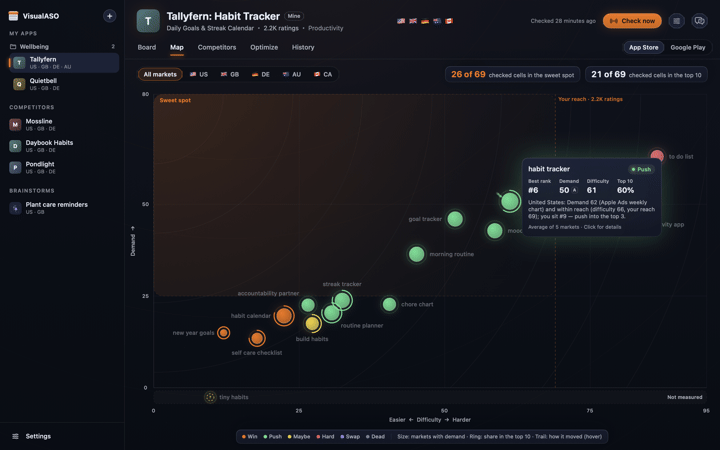
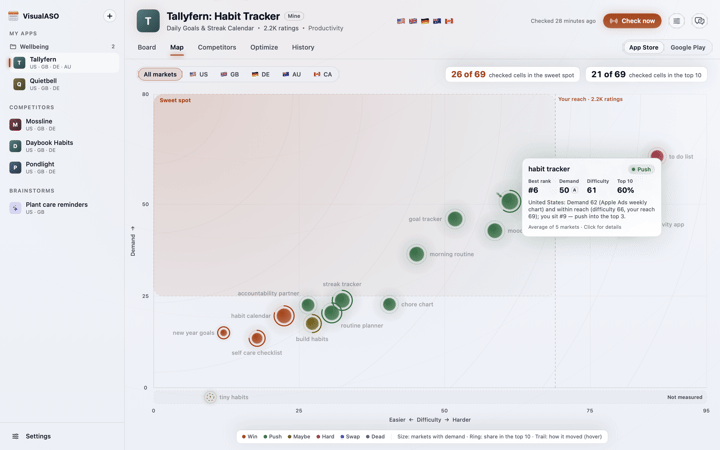
The shaded corner is where you can win: real demand and a top ten your ratings can reach. Size is how many countries search it; the ring is how much of the top ten you hold; the trail is where it moved.
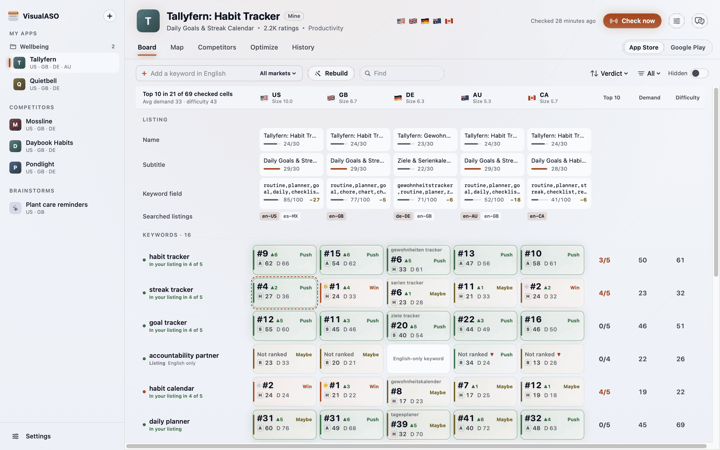
Your rank, its change since the last check, demand and difficulty, for each phrase in each country. Each cell gets a verdict and one line on why.
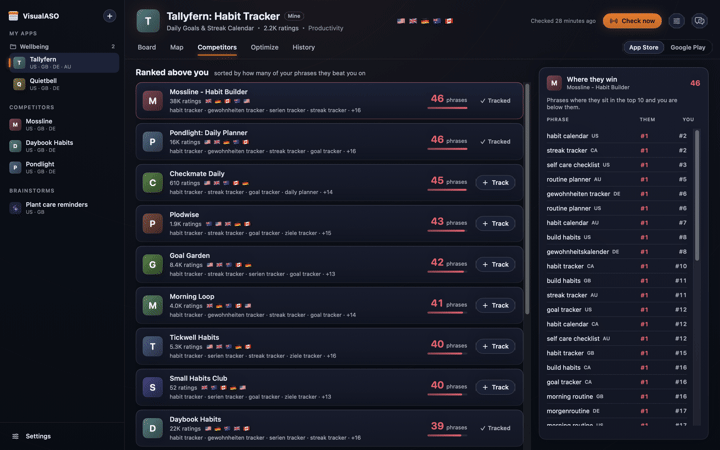
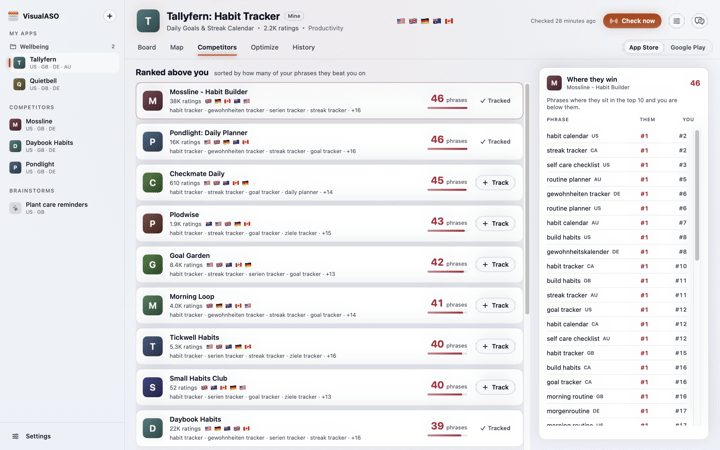
The apps that outrank you, how many of your phrases they beat you on, and in which countries. Track one and see the phrases it ranks for that you don't.
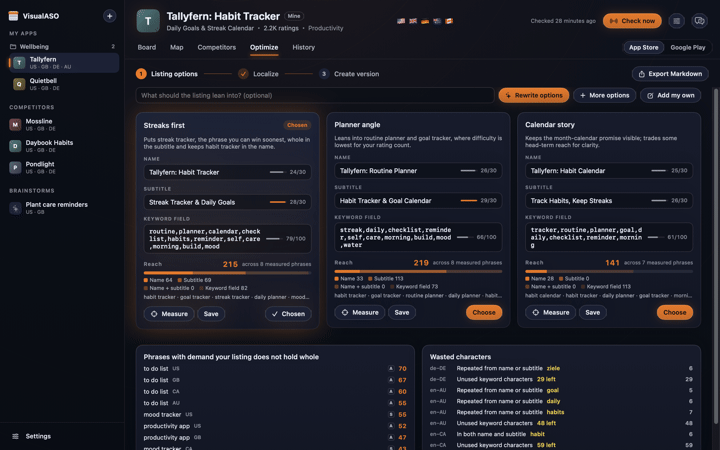
Your AI tool writes three options for name, subtitle and keyword field. VisualASO measures what each can rank for, you choose, and it translates the winner for every country you sell in. It fills a new version in App Store Connect and stops there.
You are in the top 3.
People search it and the top ten is within reach.
Worth watching.
The top ten has far more ratings than you.
It is in your listing but nobody searches it.
Measured, and nobody searches it.
VisualASO drafts names, subtitles and keyword fields with an AI tool already installed and signed in on your Mac: Claude Code with your Claude plan, OpenAI's Codex CLI with your ChatGPT plan, an API key, or a local model through Ollama.
You sign in to those tools yourself. VisualASO never sees your login and adds no AI fees. Your provider's terms and usage limits apply. Setup guide
curl -fsSL https://claude.ai/install.sh | bashclaude in Terminal and sign in with your Claude plan or an API key.brew install --cask codexcodex login and sign in with your ChatGPT plan or an API key.claude mcp add --scope user visualaso -- "/Applications/VisualASO.app/Contents/MacOS/VisualASO" --mcpOne database on your Mac. No account. Your App Store Connect and Apple Ads keys live in the macOS Keychain and go only to Apple.
Read the privacy pageFree shows you where you stand. Pro lets you act on it, for every app, in every country.
See where you stand.
Act on it.
One payment. Nothing renews. One licence works on 3 Macs you use. All future updates included.
One-time purchase of a VisualASO Pro licence for 3 Macs. No subscription; nothing renews. Payment is handled by Stripe (merchant of record), who charges any sales tax or VAT.
| Feature | Free | Pro |
|---|---|---|
| Apps | 1 | Unlimited |
| Countries per app | 3 | All 52 countries VisualASO covers |
| Keywords | 25 | Unlimited |
| Board and Map | Yes | Yes |
| Check ranks, demand and difficulty | By hand | By hand, on a schedule, and while VisualASO is closed |
| Competitors | See who beats you | Track competitors and the phrases they rank for |
| Brainstorms | 1 | Unlimited |
| Optimize: listing options from your AI tool | — | Yes |
| Translate to every country you sell in | — | Yes |
| Fill a new App Store Connect version | — | Yes, never submitted for you |
| History and “What worked” | — | Yes |
| Google Play ranks | — | Yes |
| Apple Ads popularity | — | Yes |
| Agent tools (MCP) | — | Yes |
| Alerts after each check | — | Yes |
| Export | — | Yes |
| Screenshots | One language, our templates | Every language, your own templates, captions from your AI tool |
| Macs per licence | — | 3 |
| Updates | Yes | All future updates included |
No. Pro is one payment of $99. Nothing renews. Free has no time limit and needs no card.
No, if you already use Claude Code or Codex with your plan. You can also use your own API key, or a local model through Ollama. You sign in to those tools yourself; VisualASO never sees your login. Your provider's terms and usage limits apply. Setup: AI setup.
Apple's own search suggestions, measured for each phrase in each country. Sign in to Apple Ads and VisualASO adds Apple's popularity score. Every number says which source produced it; a phrase nothing could measure shows “?”. The full table: Where the numbers come from.
Only when you press Create version. VisualASO fills a new version in App Store Connect, shows you every change first, and stops there. You submit it yourself.
Store searches go to Apple and Google to read ranks and listings. Your App Store Connect and Apple Ads requests go to Apple, with your own keys. Prompts go to the AI tool you chose, which sends them to its maker. Anonymous usage counts and crash reports go to Google Firebase, never with your keywords, apps or keys, and Settings → Privacy turns them off. An update check goes to visualaso.com. The full list is on the privacy page.
Pro tracks Google Play ranks in each country. Google publishes no search numbers, so Play shows rank only.
One Pro licence works on 3 Macs you use. Move it from Settings → Licence.
macOS 14 or later, Apple silicon and Intel. There is no Windows version.
No. VisualASO reads public App Store pages and uses Apple's official APIs with your own keys.
Must Have Apps, a small studio in Latvia founded by Zigmārs Dzērve. The studio makes iPhone apps and uses VisualASO on them every week. Press details are on the press page.
Tools
Free tools for App Store work, built on Apple's live rules and our own measurements. No account needed.
Which localizations each country's App Store search reads, and the smallest set to fill.
Open the tool → ToolDrop your screenshots: each file matched to its slot, alpha and size problems fixed.
Open the tool → ToolName, subtitle and ideas in; a packed 100-character keyword field per localization out.
Open the tool →Start free. See where you stand in three countries today. Pay $99 once when you want every country.