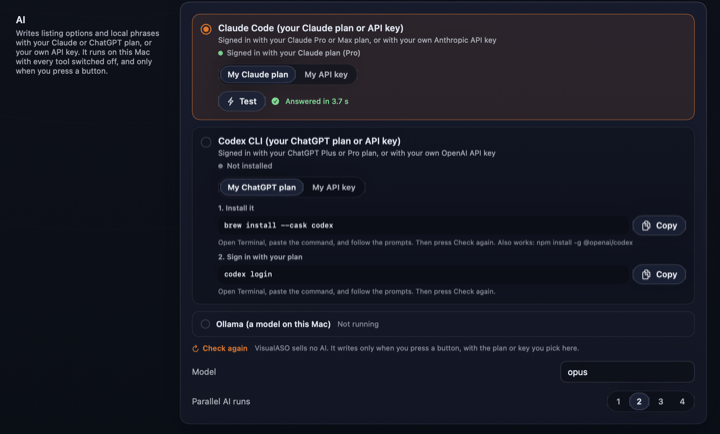
What the status line means
| VisualASO shows | Meaning | What to do |
|---|---|---|
| Signed in with your Claude plan | Claude Code is installed and signed in with a plan. | Nothing. |
| Signed in with your ChatGPT plan | Codex is installed and signed in with a plan. | Nothing. |
| Signed in with an API key (billed per use) | The tool uses an API key; your provider bills each request. | Nothing, if that is what you want. |
| Installed, not signed in | The tool is there but has no sign-in. | Run claude or codex login in Terminal. |
| Not installed | VisualASO cannot find the tool. | Install it with the command above, then press Check again. |
If your plan's limit is reached, VisualASO says so, with the reset time when the tool gives one, and changes nothing. Try again later or switch tools in Settings.
Ollama
Prefer a model on your own Mac? Install Ollama, pull a model, then in Settings → AI pick Ollama and type the model name under Model. Nothing leaves your Mac, but small models write weaker listings.
What VisualASO sends to the tool
The prompt holds your app's brief, the phrases with their numbers, and Apple's field limits. The tool runs with its own tools turned off. VisualASO never reads, copies or stores the tool's sign-in.
Writing listings uses your plan's limits like any other chat.
Something unclear or out of date? Write to hello@musthaveappscorp.com.